 MyBlueBerry
MyBlueBerry Support
A baby tracker for one hand, half-asleep, in the dark. Below are answers to the most common questions. Anything else: help@myblueberrylabs.com.
How do I log a feed, diaper, sleep, or solids?
The main screen shows a big tile for each activity your child tracks: Bottle and/or Nursing (set by feeding mode — see below), Diaper, Sleep, and Solids once it's enabled.
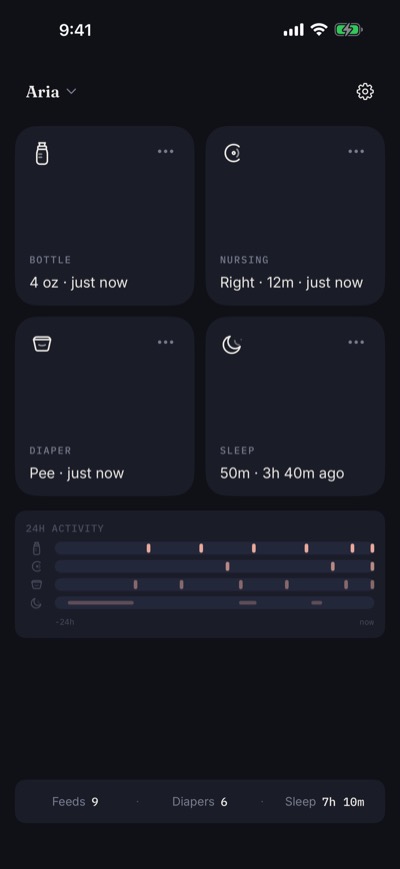
- Bottle: tap the tile, then tap LOG. The amount is remembered from your last feed; slide to change it.
- Nursing: tap the left or right half of the tile to pre-select the side, then LOG. Session length and "Both" are adjustable in the editor.
- Diaper: tap the tile, pick Pee / Poo / Mixed, then LOG. For Poo or Mixed you can pick a stool color — useful for pediatrician questions.
- Sleep: tap to start a sleep, tap again to end it. An in-progress nap stays visible on the tile and in the activity lanes, even if you close the app.
- Solids: tap the tile, pick the foods (search is typo-tolerant, and frequent foods appear as chips), then LOG. You can note the amount and how each food went.
Time always defaults to now. Logging something that happened earlier? Slide the time backward before tapping LOG — slow drag for minutes, fast flick for hours. The slider reaches up to 12 hours back; for anything older, open More and set the date and time directly.
How do I fix an entry?
The lanes below the tiles show the last 24 hours. Tap near a mark to inspect the entry, then tap Edit in the preview to correct it. Older entries are reachable in the Report Card by paging back through earlier days.
What's the Report Card?
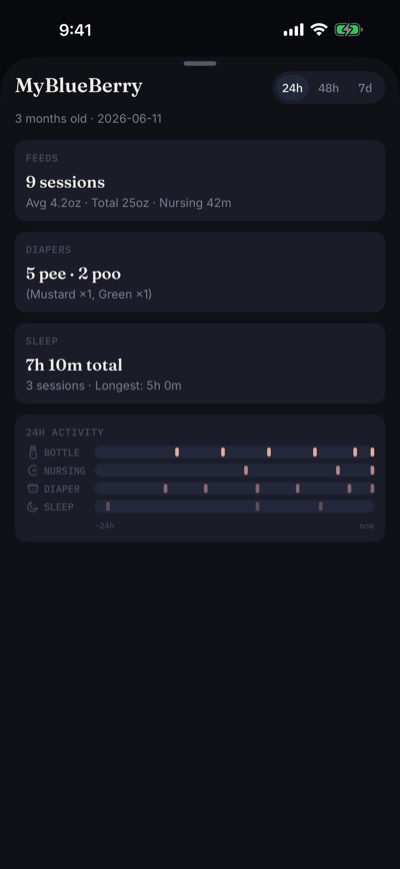
Tap the summary bar at the bottom of the screen. It shows feeds, diapers (with stool colors), sleep, and solids for the last 24 hours — flip the toggle at the top for the 7-day view, or use the arrows to page back through earlier days. Everything fits one screen: take a screenshot and text or email it to your pediatrician — that's the intended sharing flow.
How do I share with my partner or a caregiver?
Settings (gear icon) → SHARED WITH → Caregivers → Invite a caregiver, then enter the email address of their iCloud account. Both of you need the app installed and need to be signed in to iCloud. The share happens account to account through Apple's iCloud — your baby's data never passes through our servers, because there are none. After your caregiver joins, you both see and log the same entries, in sync.
Can I track more than one child?
Yes. Settings → TRACKING → Add child. Each child keeps a completely separate log. Switch between children from the selector at the top of the main screen or from Settings → TRACKING — one tap, everything updates instantly.
Can I switch feeding modes — bottle, nursing, or both?
Yes, any time. Feeding journeys evolve — starting with nursing and adding bottles later is common. Settings (gear icon) → TRACKING → tap your child's active row → pick Bottle / Nursing / Both. The change applies immediately — there's no Save button.
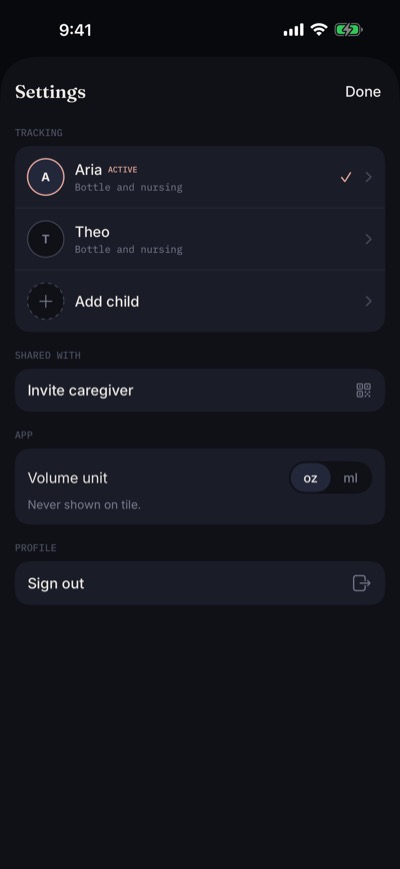
The mode controls which logging tiles and activity lanes appear on the main screen. With a single feeding mode, the feeding tile becomes the large full-width tile at the top, showing your last feed alongside today's running total.
Switching modes never deletes any logged history. Changing feeding mode only changes which tiles appear going forward — past entries of the other type stay in your timeline and Report Card.
Where is my data stored? Can you see it?
On your device and in your private iCloud database. We run no servers and cannot access your data. See the full privacy policy for details.
How do I delete my data?
A single entry: tap it in the activity lanes, tap Edit, then the trash button in the editor header — an Undo toast gives you a moment to change your mind. Everything: in-app Settings (gear icon) → PROFILE → Delete account & data removes every record from your device and your iCloud, revokes any caregiver shares, and signs you out. Caution: this permanently erases your child's entire history — we hold no copy and cannot restore it.
Something's not working
- Entries not appearing on another device? Both devices must be signed in to the same iCloud account with iCloud Drive enabled. Sync resumes automatically when the device is back online — the small dot in the summary bar shows sync state.
- Anything else: email help@myblueberrylabs.com with your iOS version and a description of what happened. We typically reply within a few days.